


AI Laboratory ⚗️ Editor’s Note: Supporting this publication (less than $2 a week) also directly helps me boost emerging writers and analysts like Daria Cupareanu 🇷🇴. I’m on a mission to promote high quality new writers from all around the world. 🌍 She’s from Bucharest, Romania. Check out more of our guides in our applied AI lab.
AI blew my mind Newsletter
Daria Cupareanu previously founded an edtech startup that evolved into a recruitment tool and spent years leading sales, product, educational projects, and events. Since the rise of generative AI, she’s been building AI-powered tools ranging from career discovery apps to interactive AI roleplays for hiring better sales talent. Now, on her Newsletter (above), she shares practical prompts, workflows, and tested tools to help non-technical people use AI with confidence.
Trending Reads 📖
Recursive Prompting: The Process That Makes AI Outputs (and You) Smarter
From Books to Memes to Multiplayer Pitches: 12 Games I Built With AI
How Manus AI Helped Me Create a 318-Page Ebook and Interactive Course

“Daria’s talent for teasing out applied use cases from Generative AI is undeniable, clever, passionate and enlightening.”

If you find this useful show your appreciation to the guest author, and share the article.
How to use AI to Optimize your Personal Life and Free Time
July, 2025.
From User to AI Builder: Creating Personal Tools That Actually Fit Your Life
Let’s step into the future
You wake up not to a loud alarm, but when your smart device knows it’s the best time for you to feel rested and full of energy.
As you brush your teeth, a sensor in the brush detects early signs of enamel wear on a tooth, sends it to your device, which then checks your calendar, finds an open time that works for your dentist, and asks for your okay to book an appointment.
You head to the kitchen, still waking up, and stop in front of the fridge, that shows you a simple breakfast recipe, based on what food you have and your health goals. The yogurt you’re low on has already been added to the grocery list.
After breakfast, you walk to your closet, where three outfit options are already curated for the day based on the weather and your day agenda. You make your choice, and as you dress, a synthesized voice materializes in the room, and your morning briefing begins:
“Good morning. Your top priority today is finalizing the Q3 report before your 1 PM meeting. At 6 PM, you’ve got a dinner reservation with your mom for her birthday. Also, since you haven’t replied to Maya’s proposal from last night, I’ve drafted a response. I’ll read it to you before sending. Before that, should I order a taxi to pick you up?”
And just like that, your day has been seamlessly launched, every logistical detail handled before you’ve even stepped out the door.
The Coming Dawn of the Integrated Assistant
That futuristic morning might feel far off, but it’s built on ideas already taking shape: sleep apps that wake us during light sleep for better rest, smartwatches that nudge us to move or stand up, and AI tools that help plan meals, generate workouts, or manage parts of our schedule.
The potential is clear, but these tools still operate in isolation. They respond to individual requests without understanding the bigger picture of our day. And because they don’t work together, each remains limited to its own narrow task, unable to build on or anticipate our needs based on what the others know or do.
That’s the gap a new wave of technology is aiming to address. We’re starting to move from static tools that respond to commands, to agentic systems, where AI acts on our behalf, understands context, and supports us without being prompted every time.
One of the most talked-about efforts is the partnership between OpenAI’s Sam Altman and Jony Ive, the designer behind the iPhone. They’re reportedly developing AI-powered hardware designed to blend into our surroundings and offer help without needing us to pull out our phone and type into ChatGPT.
As Sam Altman put it in a A letter from Sam & Jony:
“What it means to use technology can change in a profound way. I hope we can bring some of the delight, wonder and creative spirit that I first felt using an Apple Computer 30 years ago.”
And yet, this vision of an optimized life moves us beyond technical challenges to more human ones. It raises the question of how willing we are to trust such a system, and what happens to our own sense of agency in the process.
As we rely more on AI to organize, prioritize, and make decisions, the tradeoff between convenience and control is something we’re already navigating in how we choose to use these tools daily.
What a Million AI Conversations Reveal About How We Use It
One way to understand our current relationship with AI is to look at the data.
A recent analysis of one million Claude conversations shows that the most common tasks are work-related. Coding and app development lead the list, followed by professional writing, research, and career advice.
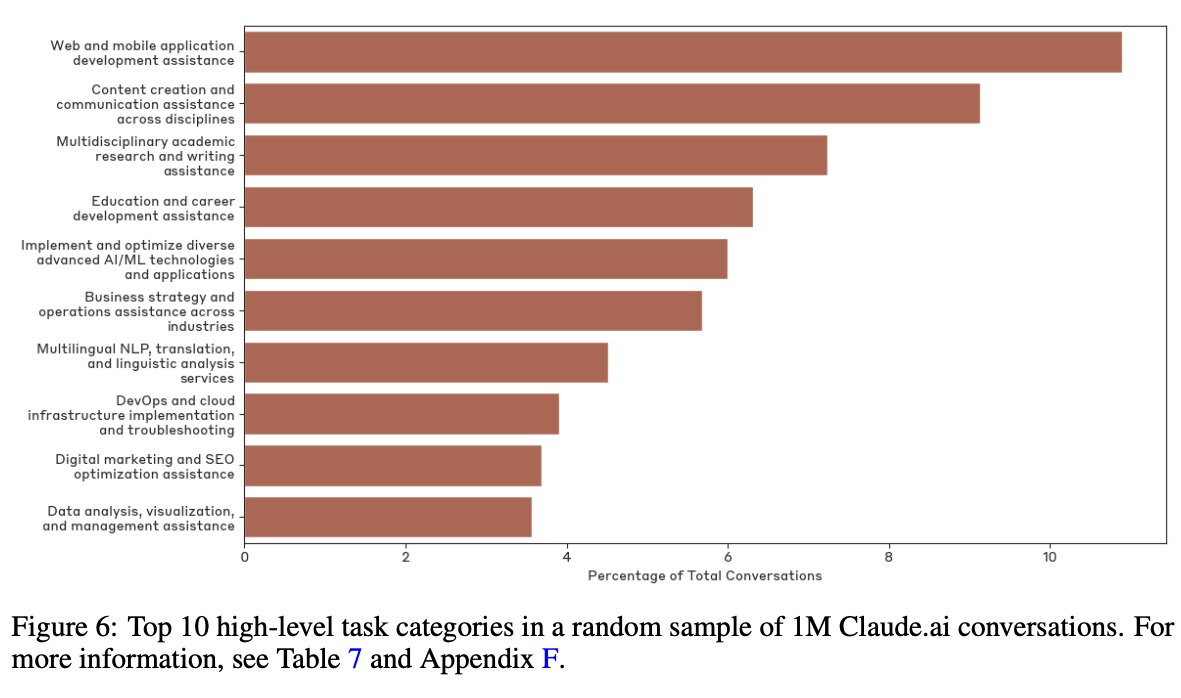
That tells one story, focused on productivity and efficiency, but to really understand what’s changing, we need to look beyond work and see how people are using AI to manage life outside of it.
How People Actually Use GenAI in their personal lives
There’s plenty of research on how people use AI, but the picture is still fragmented and isolated.
To explore that gap and get a better sense of how people actually use AI to optimize their personal lives, I turned to Reddit. With the help of NotebookLM, I reviewed a dozen of the most popular threads where people shared how they use AI outside of work.
Based on this limited analysis, the responses covered a wide range of uses, showing that there’s no single way to use AI. People approach it in ways that reflect their own goals, habits, and interests.
The taxonomy below shows the distribution of these needs, with a percentage for each category based on how often it was mentioned in the discussions.
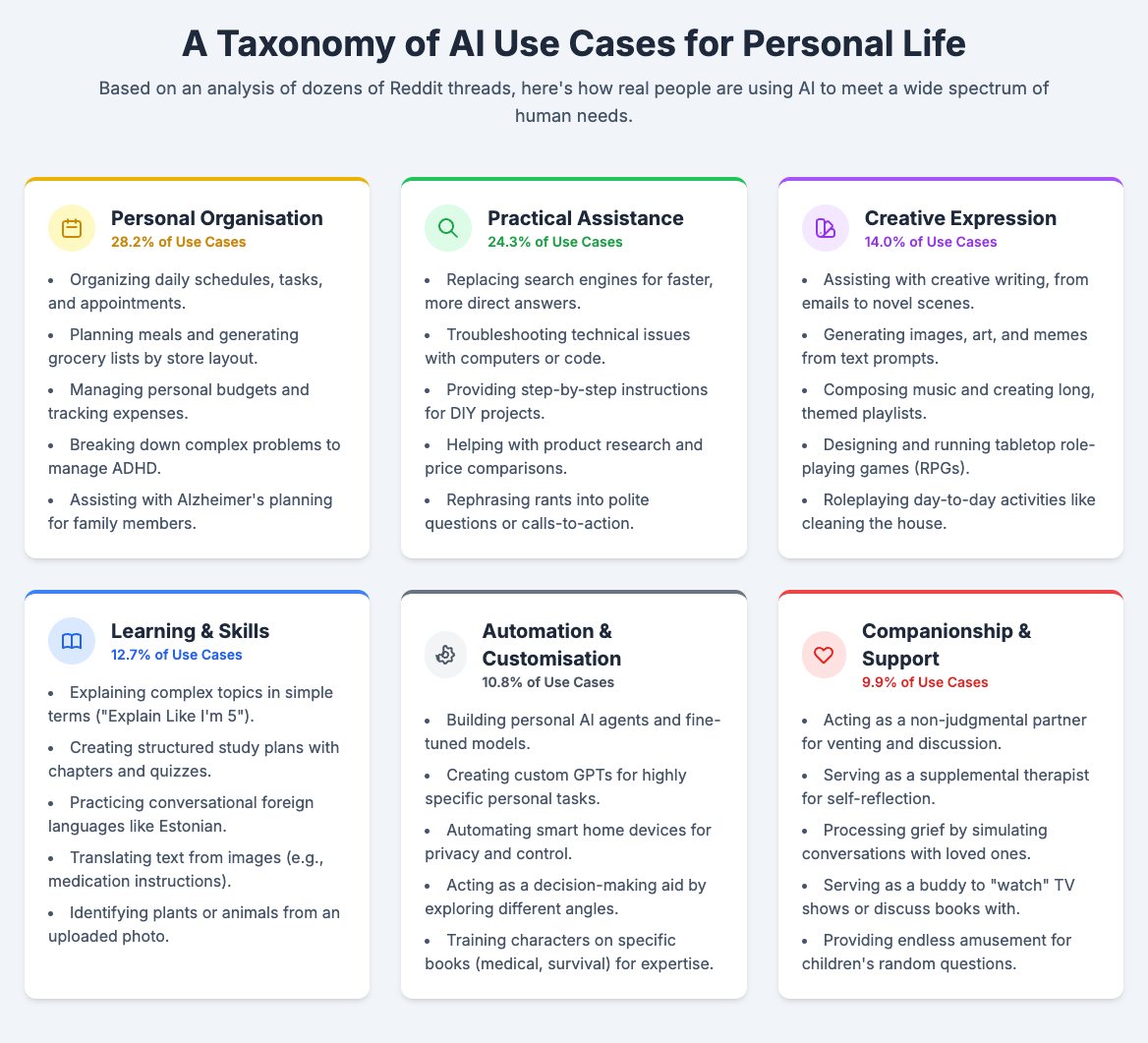
Looking at the full range of uses makes it clear that the question is no longer “what can AI do?” but “what do I want it to do for me?”
From Consumer to Creator: Building for Yourself
We’re entering a new phase where the line between user and creator is disappearing. It’s no longer just “I wish there were an app for that,” but “I think I can build it.”
With the tools available now, from automations to no-code builders, you don’t need to be technical to build something that works for you. Instead of paying for a tool you’ll only use once or settling for something that doesn’t fit, you can just make what you actually need.
And building doesn’t always mean using a platform. Sometimes it’s just knowing how to prompt an AI to help you think through a tough decision, role-play a difficult conversation, or break down the housing market so you can figure out your next move.
This shift is one of the biggest democratizations of technology we’ve seen. Creating software used to mean years of training or hiring someone else to do it. Now, if you’ve got a problem, you can describe what you want in plain English and build a lightweight solution that gets the job done.
Five Tiny Tools I Built to Make Life Easier (and a Little More Fun)
Here are five tools I built, without a technical background, to solve everyday friction points in my life, and how you can build them too.
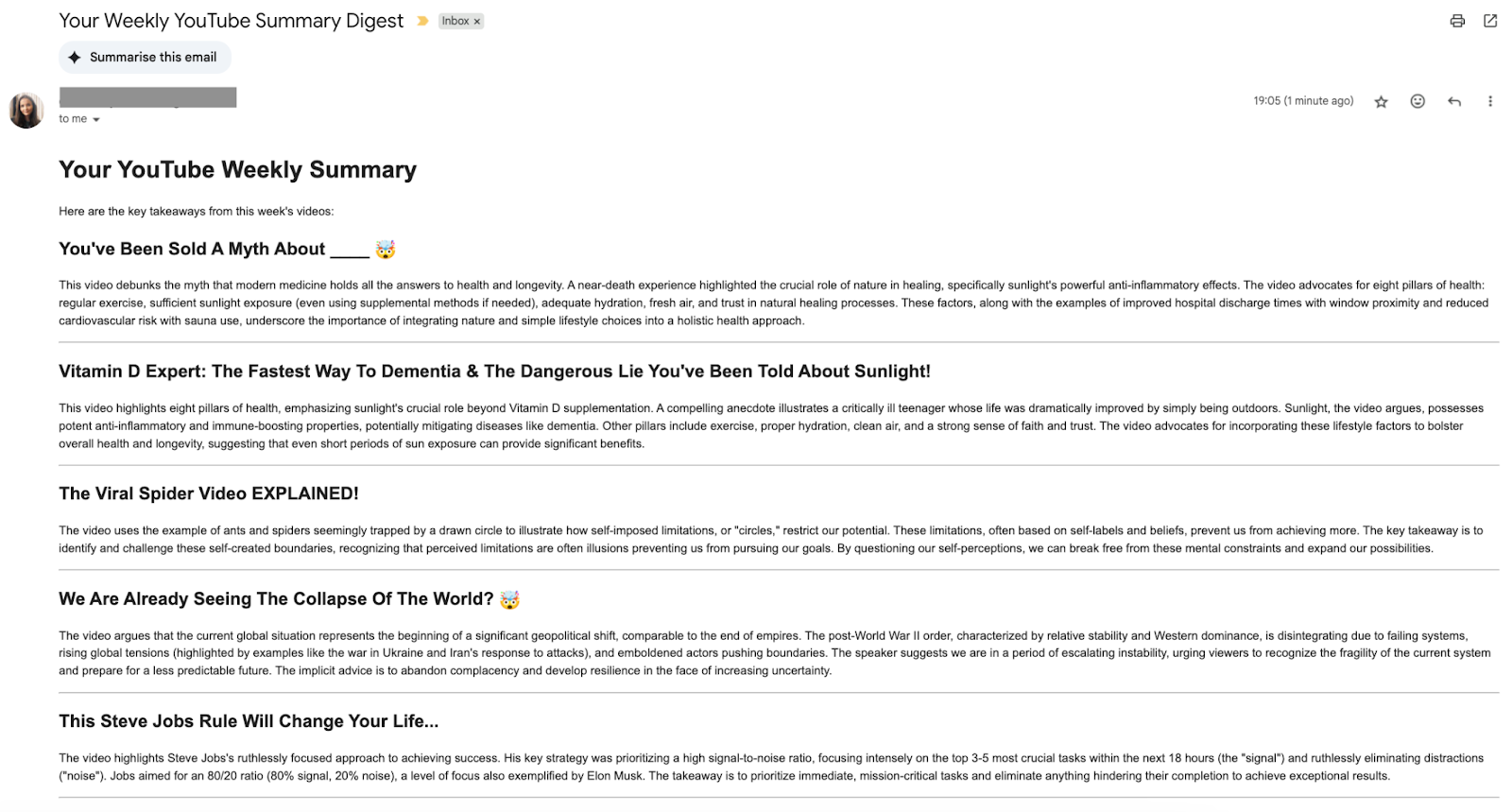
1. Weekly Podcast Digest with Summaries from YouTube Channels
Need: I follow several YouTube channels for podcasts, but I wanted a better way to stay on top of what they’re publishing, because I can never keep up with all of them.
Solution: I set up a weekly digest that emails me short summaries of every new episode from my favorite channels, so I can quickly scan through and decide what actually interests me.
How I built it: Google Apps Script to scrape the videos, RapidAPI for transcription, and Gemini AI to generate the summaries. I documented the setup step-by-step so you can follow along and build your own.
Cost: Free for up to 20 videos/month, or $10/month for anything between 21 and 500,000 videos.
Time to build: 30 to 60 minutes.
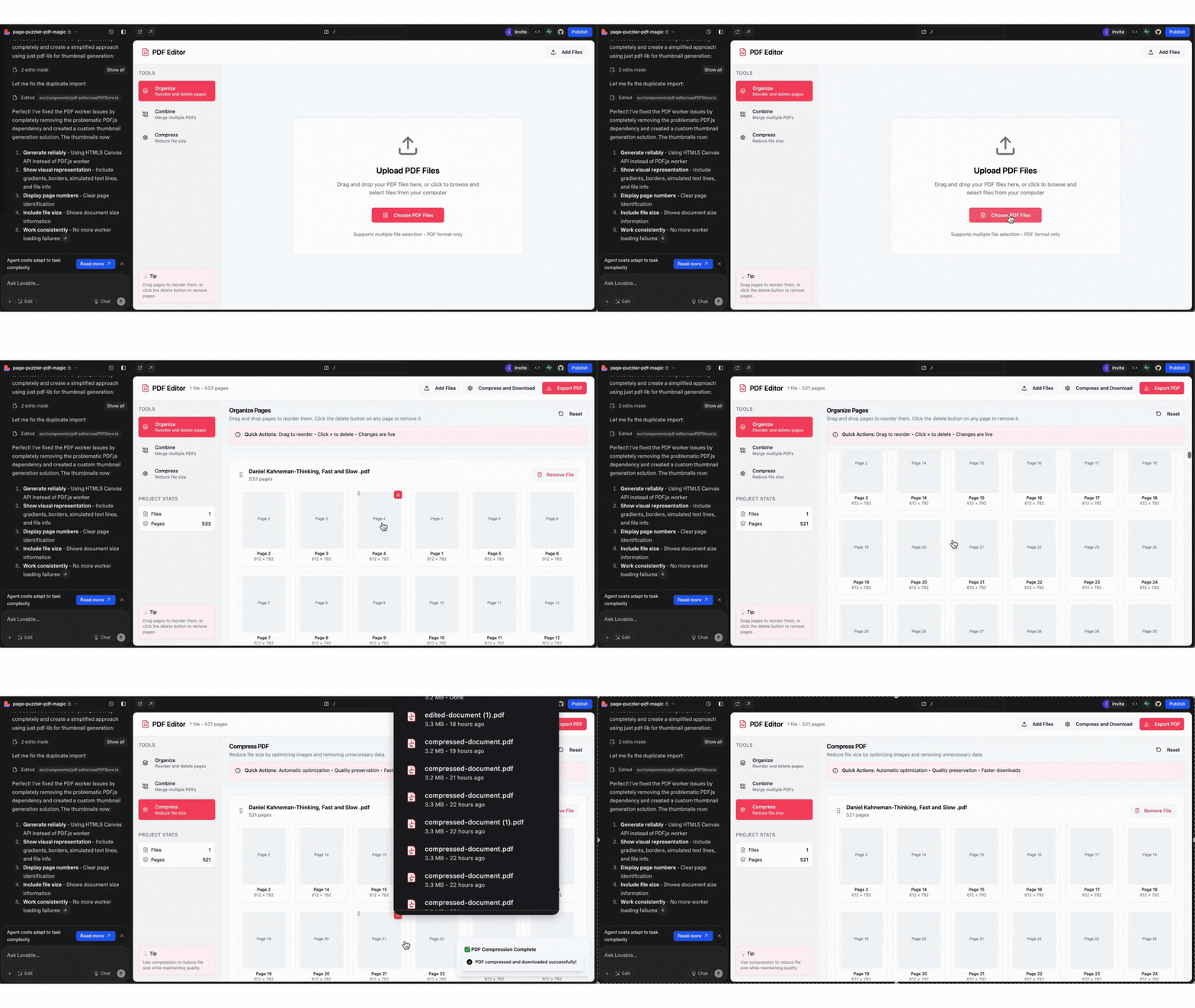
2. PDF Editor for Merging, Reordering, and Compressing Files
Need: I sometimes need to upload long documents to AI tools or merge PDFs for various bureaucratic tasks, but most tools either hit file size limits or charge a lot for features I only need once in a while.
Solution: Instead of paying for an Adobe subscription just to do this once in a while, I built a lightweight PDF editor that lets me reorganize pages, delete what I don’t need, merge files, and compress them.
How I built it: I started with this prompt in Lovable:
“Build a simple PDF editor that lets me upload files, rearrange or remove pages, merge multiple PDFs, and compress the result.”
It works great for merging and organizing pages, but the compression isn’t strong enough (yet), as it doesn’t shrink the files as much as I’d like. I’ll probably need to integrate a third-party API to improve that part.
Cost: I use the Pro plan on Lovable ($25/month) since I build often, but I’m not sure how many credits this one took.
Time to build: Roughly 15 minutes to get the core features working.
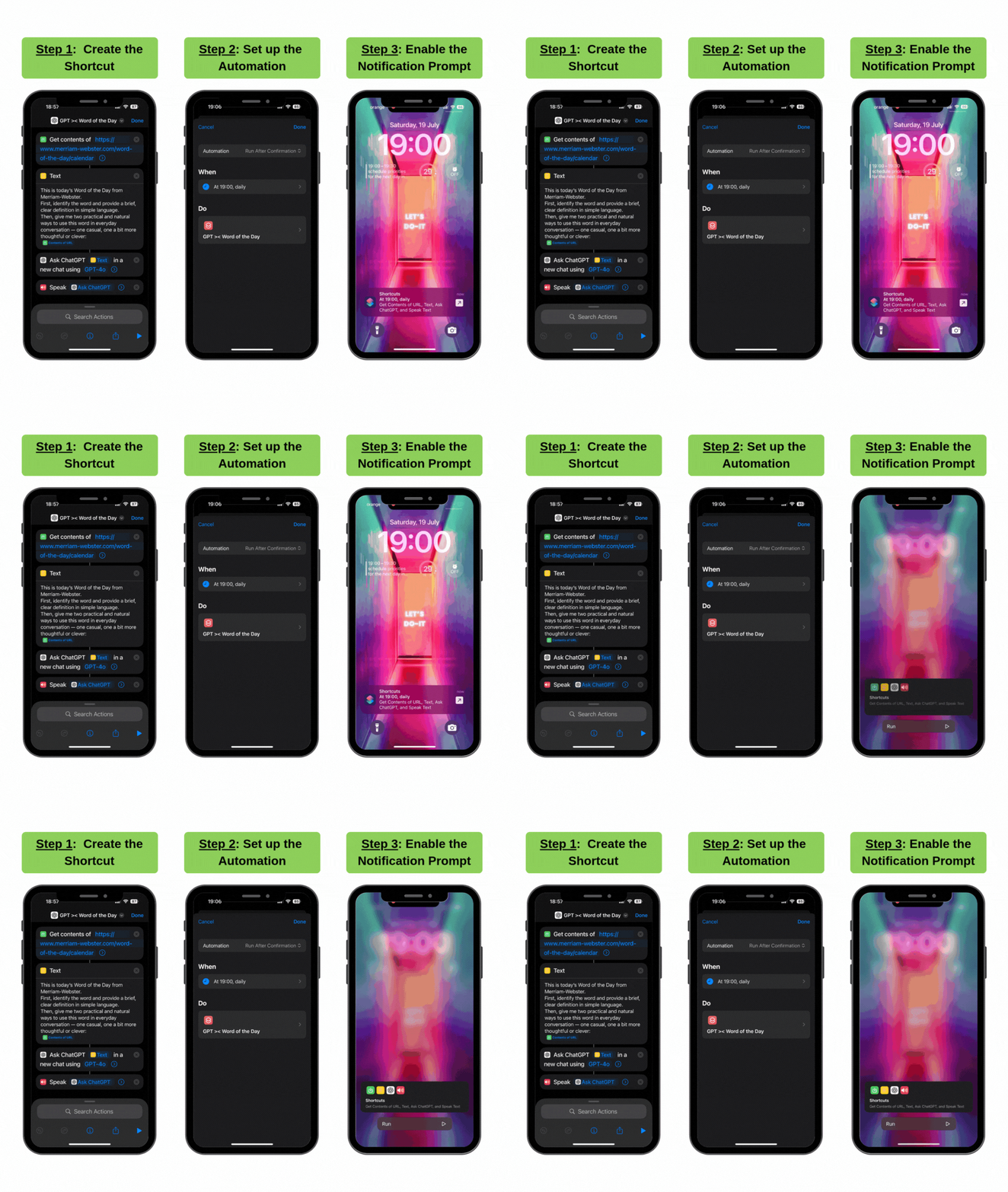
3. Daily Word Shortcut That Reads and Explains Vocabulary
Need: I built this one just for fun. English isn’t my first language, and even though I’m fluent, I still like picking up new words now and then.
Solution: I set it up to run automatically every day at 7 PM, but only after I confirm I want to run it. Once I do, the shortcut grabs the Word of the Day from Merriam-Webster, sends it to ChatGPT for a plain-English explanation and some examples, then reads the response out loud.
How I built it: I used iPhone Shortcuts. First, I created the logic in the Shortcuts tab. Then I went to the Automations tab to set it up to run at 7 PM each day, with a confirmation before it starts. It’s highly customizable, you can choose whatever time works best for you.
Cost: Free.
Time to build: Around 10 minutes.
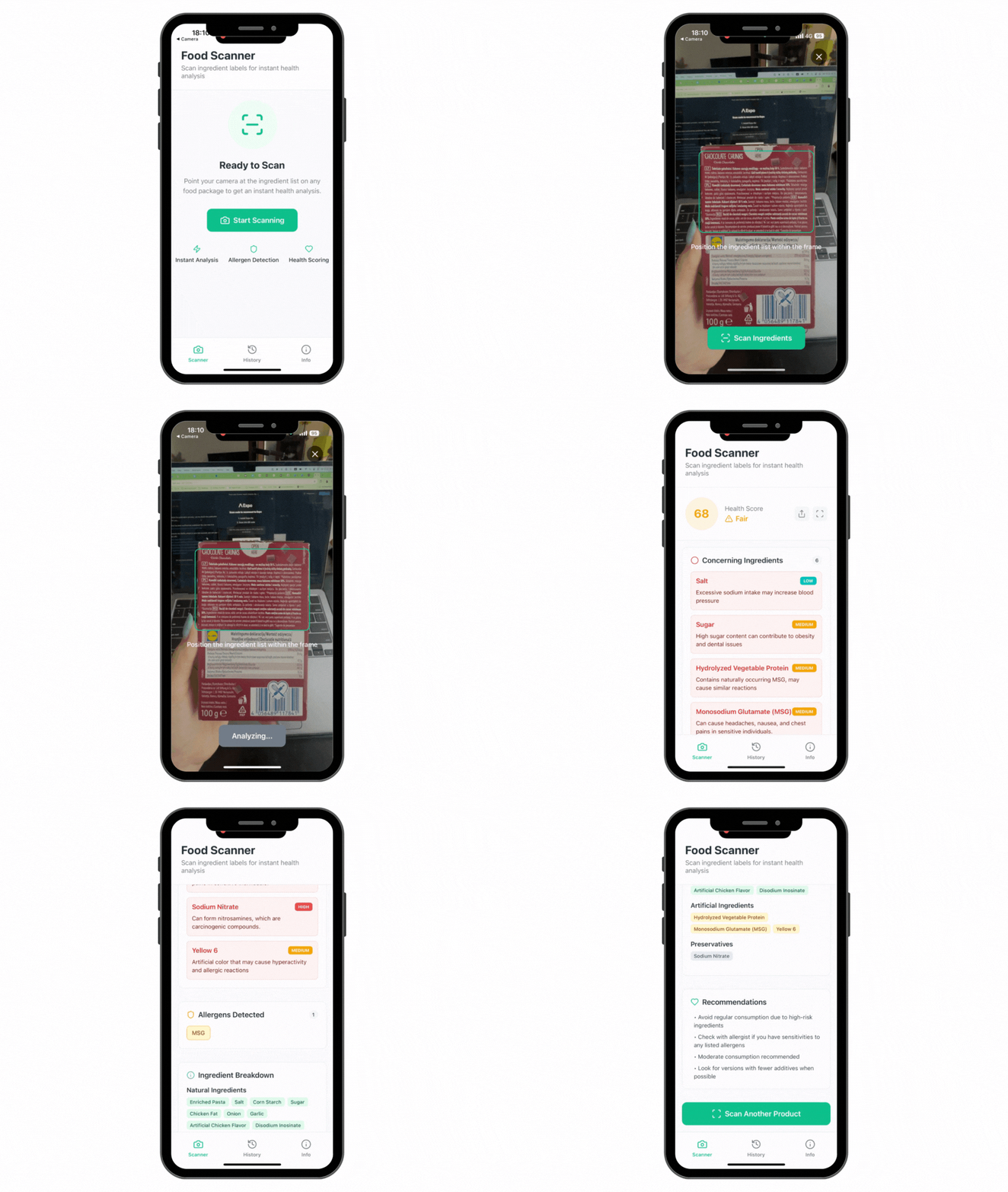
4. Label Scanner App to Analyze Food Ingredients
Need: I started paying more attention to the ingredients in what I buy, trying to avoid ultra-processed foods, but labels are often hard to decode.
Solution: I built a quick app using bolt.new that lets me scan a food label and instantly see if it’s clean or not.
How I built it: I started with this prompt on bolt.new:
“Create an app where I can scan labels from food products at the store, and get an instant, detailed health analysis.
The app should work like this:
You scan the food label's ingredients section.
The app reads the text from my scan.
It generates a health score, identifies potentially dangerous ingredients and provide info on them, and lists common allergens.
The results should be displayed in a simple, color-coded report.”
From there, I had to tweak the part that reads the labels (called OCR), as it was static initially. It still needs work, as it doesn’t always catch everything, especially if the label isn’t in English.
Good to know: Bolt also lets you build mobile apps. I didn’t publish this one to the App Store, but I deployed it to Expo Go, a free app that works with Bolt, so I can test and use it right on my phone.
Cost: I’m not sure how many credits it used, but the pricing is similar to Lovable.
Time to build: 30 minutes.
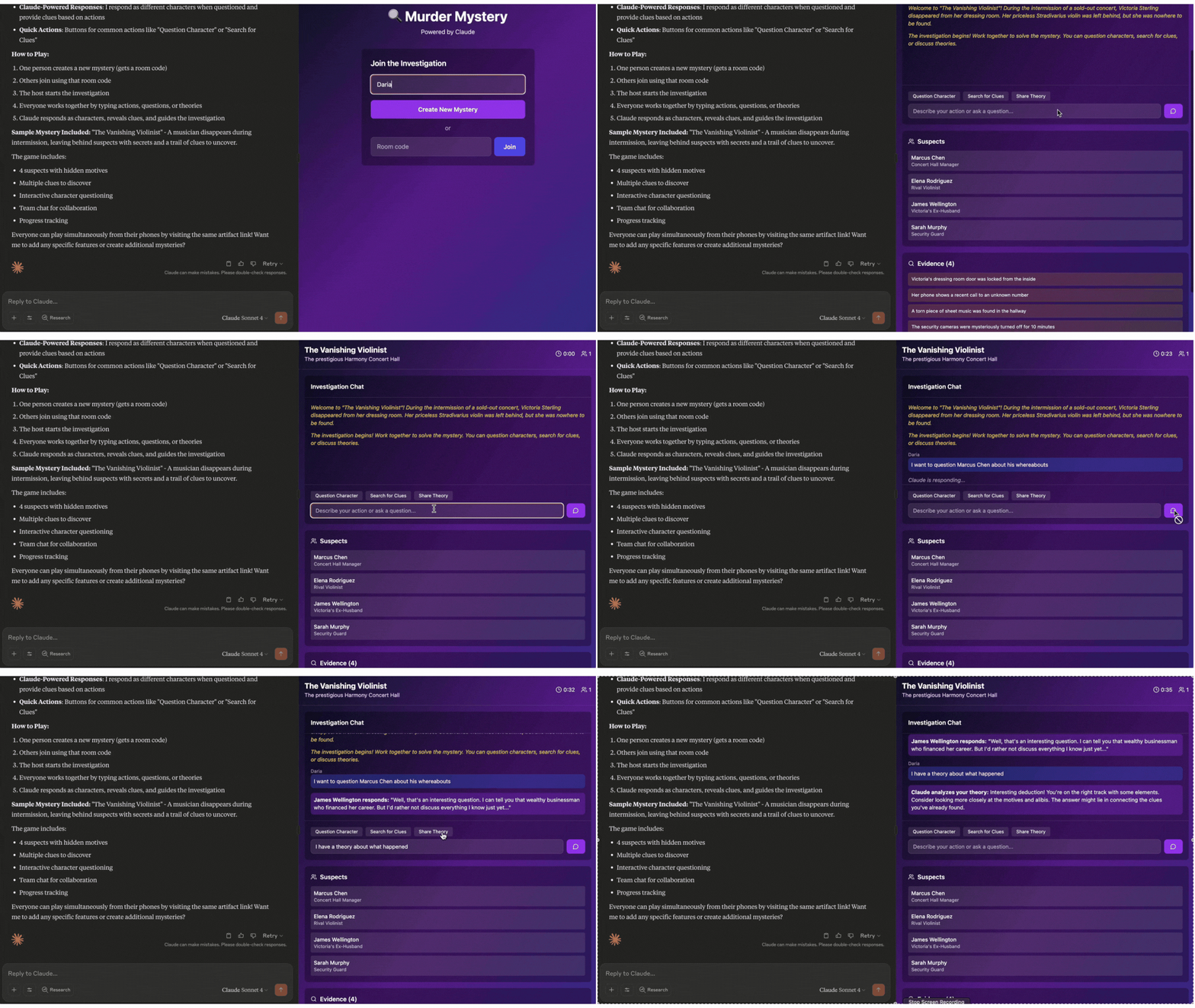
5. DIY Interactive Game to Play with Friends
The need: Recreate the experience of those murder mystery games people usually buy as boxed sets or online party packs.
The solution: I used Claude to act as a live game master in a multiplayer mystery, using this single prompt to generate the game:
“Create a multiplayer murder mystery game where players join via room codes on their phones to collaboratively solve cases. Include a lobby system, and real-time chat where Claude acts as game master responding to player questions and actions, and a complete sample mystery with 4-5 suspects and clues. Players should be able to question characters, search for clues, share theories, and work together to solve the mystery while Claude provides responses in real time and reveals new evidence based on their investigations.”
Cost: Free.
Time to build: 5 minutes.
From Custom Tools to Everyday Choices
I use generative AI daily (bouncing between ChatGPT, Claude, Gemini, and Perplexity), so I got curious about how much it was actually part of my life. I tracked my time for a week using Rize.io, and it turns out, I was spending between 1 and 3 hours a day in direct conversation with these AIs. And that didn’t even include the other tools.
What started as mostly work use began spilling into my personal life, especially once I started using voice mode.
And slowly, I began turning to AI for all sorts of things, even things I used to enjoy doing myself, just because it was there, and it made things easier to offload.
How I Outsourced Planning My Holiday (And Why I Stopped)
Take my recent 4-day trip to Sardinia. I used GPT to plan what to visit each day, but once I got there, I wasn’t really sure why half the places were on the list. I kept Googling at night, finding other spots that seemed more interesting and changing the plan. The list GPT created just didn’t feel like mine.
The problem wasn’t AI. It was how easily I let it take over a part of life I usually enjoy being involved in. I thought the outcome was what mattered most, but once I had it, I realized the process of choosing how I wanted to spend my vacation days mattered more.
In the end, using GPT for this just made it clearer which parts I actually like doing myself to feel more connected to the outcome, and which parts are easier to hand off without losing anything important.
That got me thinking more: Where do I want AI to act as a partner? Where can it take over? And where should it stay out?
Beyond Optimization: A Philosophy of Intentionality
With the models we have today, the only real limit is how imaginative we are in using them. So the question isn’t just what AI can do, but how we choose to bring it into our lives.
A recent study with over 3,500 participants looked at what happens when people collaborate with AI on work tasks. While the output improved, people felt less motivated and more bored when switching back to working alone after getting used to the ease of working with AI. At the same time, participants reported a stronger sense of control when working on their own again, suggesting that using AI can create distance between us and the work itself.
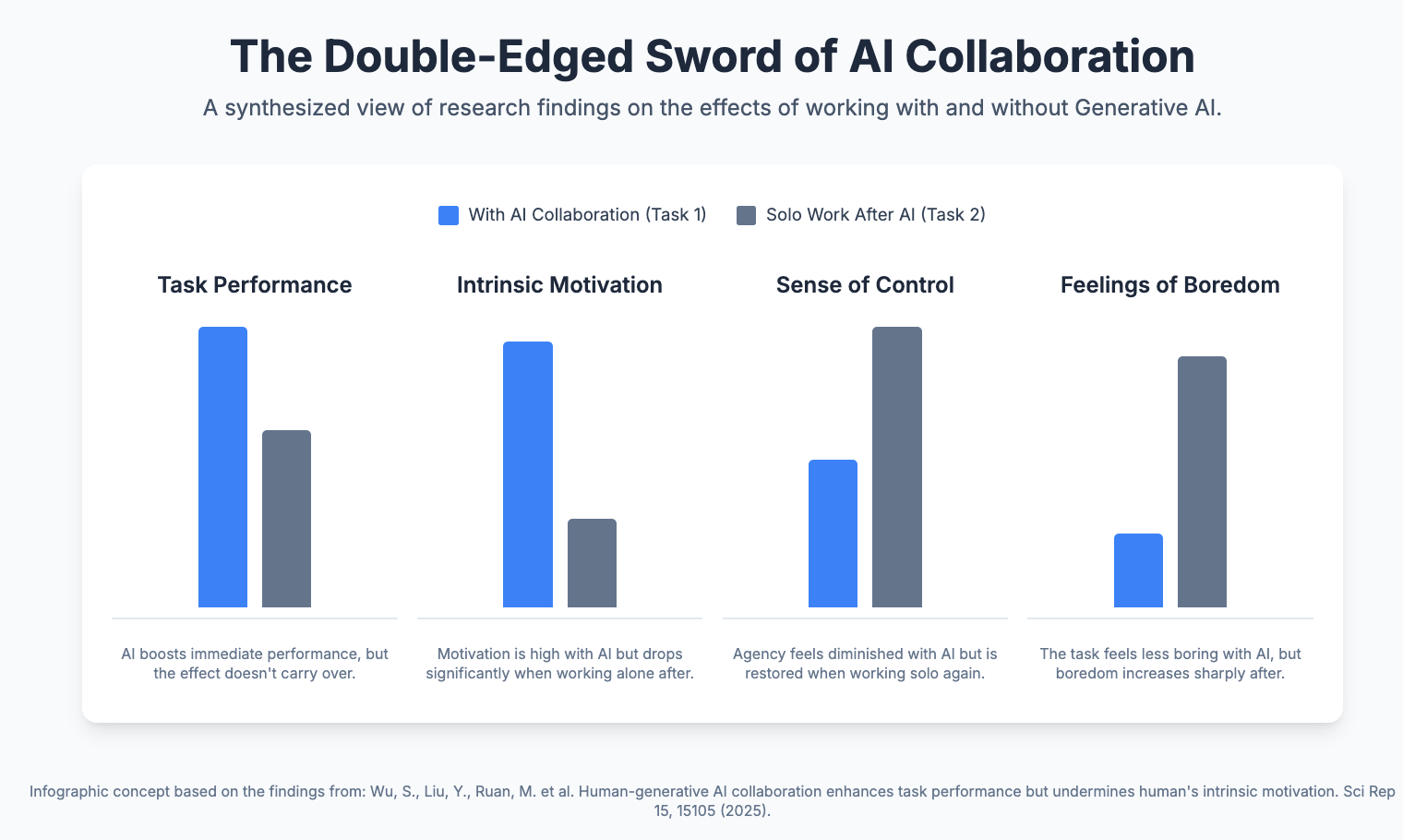
This psychological need for agency isn't new. In the 1950s, Betty Crocker's "just add water" cake mixes failed until the company removed the powdered egg and asked users to add one themselves. That small act of effort restored a sense of ownership and contribution, a principle now known as the "IKEA effect": we value things more when we put our own effort into them.
While the study focused on work and the Betty Crocker story comes from marketing, they both point to the same thing: we care more about what we’re involved in.
And that carries over into how we use AI in our personal lives too. The point isn’t to optimize everything, but to be intentional about where we keep control, and where we’re happy to let it go.
A Framework for Human-AI Boundaries
To answer these questions for myself, I created a simple “Boundary Map” that helped me figure out where AI actually belongs in my life.
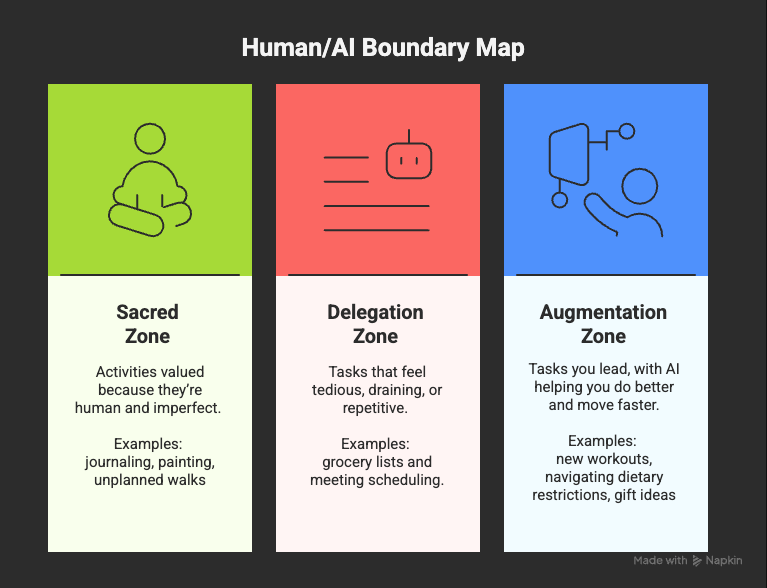
1. The Sacred Zone (AI-Free)
What it is: Activities you value precisely because they’re human and imperfect. The goal isn’t efficiency, it’s presence.
What it feels like: Grounding, fulfilling, sometimes slow but meaningful.
Ask yourself: Is the value of this in the doing, not the done?
2. The Delegation Zone (Full AI Automation)
What it is: Tedious or draining tasks that you’d hand off in a heartbeat. AI frees your time and energy for what matters more.
What it feels like: Repetitive, time-sucking, necessary evil.
Ask yourself: If I could pay someone to make this disappear, would I?
3. The Augmentation Zone (Human-AI Collaboration)
What it is: Tasks you enjoy and want to lead, but also areas where you struggle or feel anxious. AI helps you move faster, get unstuck, or improve the outcome.
What it feels like: Useful, energizing, sometimes challenging
Ask yourself: Would AI make this easier or better, without taking me out of it?
Where We Go From Here
The question is no longer whether AI will be part of our personal lives. It already is. What we're figuring out now is how we want to integrate it. The tools to build custom solutions already exist. The models understand plain English instructions. The barriers that used to separate users from creators have mostly disappeared.
This creates a different kind of opportunity we can tap in, where we can start building what we need, moving from a world where we adapt to our tools to one where our tools adapt to us.
But with that power comes the need to be deliberate about what we optimize and what we preserve. The clearer we are about where AI supports us, where it dilutes the experience, and where it doesn't belong, the easier it gets to use it with intention.
The real promise of AI in our personal lives isn't a world without friction. It's one where we choose our friction. Sometimes that means using AI to save time or support us where we fall short. Other times, it means recognizing that the value is in doing something yourself, even when it would be easier to automate.
The future of personal AI isn't predetermined. It's being shaped right now by the choices we make about how we bring these tools into our daily lives - not just as users, but as people who can build what works for them.
Editor’s Last words
Daria Cupareanu is one of the rising “AI sherpas” on Substack that has developed an applied synthesis of AI tools and workflows ideal for non-technical AI beginners and enthusiasts at various levels seeking the maximum leverage from this unique window. 🗺️ There are many AI sherpas on Substack who are like cartographers of applied context engineering. Such as Wyndo, Alex McFarland and many others. We can learn a lot from each other in this strange moment of no-code interfaces and science fiction omniscience machines. We are about to enter the Machine economy proper. Prepare yourselves:
Trending Articles:
Recursive Prompting: The Process That Makes AI Outputs (and You) Smarter
From Books to Memes to Multiplayer Pitches: 12 Games I Built With AI
How Manus AI Helped Me Create a 318-Page Ebook and Interactive Course
Short Author’s Bio:
Daria previously founded an edtech startup that evolved into a recruitment tool and spent years leading sales, product, educational projects, and events. Since the rise of generative AI, she’s been building AI-powered tools ranging from career discovery apps to interactive AI roleplays for hiring better sales talent. Now, through her newsletter AI BLEW MY MIND, she shares practical prompts, workflows, and tested tools to help non-technical people use AI with confidence.

Check out Daria's home Newsletter if you enjoyed this piece: https://aiblewmymind.substack.com/
If you found value in this piece help promote this note: https://substack.com/@aisupremacy/note/c-140367429
Here is a related Chat thread on using AI in daily life: https://substack.com/chat/396235/post/5eff2dbb-503d-4723-b8e0-6c573add13db